Back to the RAOK Tutorials Page.
Back to the main RAOK page.
Blocking Third Party Software Applications
There is currently no consensus on what to do with third party softwear applications in Facebook. You are free to accept them if you choose and even to invite others to use them, but you should think twice about giving some anonymous developer and his software access to your profile, even if a friend recommends the application. Moreover, Facebook's native functionality lets you do many of the same things as third party applications. You can share graphics via photos. RAOK keeps track of your friends birthdays. There are walls and notes and messages for communiction etc...
If you want to get rid of a third party software application, for which you have received an invite, the best method for keeping it out of your profile is not to ignore it (It still sometimes wants to access your profile) or blocking your friend (It's not his/her fault.). The most effective and humane method is to block the application itself. Here is how.
- On nearly all third party software applications such as the one below, is a link in small print that says Block Application.
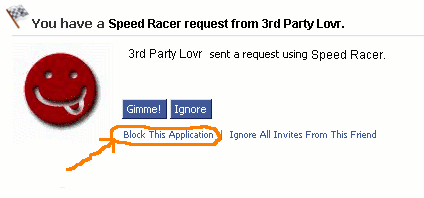
- Click on the Block Application fine print.
- You wil get a box that looks like the one below.
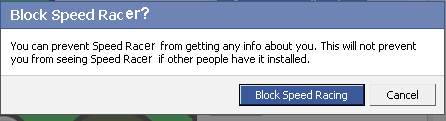
- Confirm you want to block this piece of software, and it will not access your profile. Your privacy is assured, and your friend can still communiate with you.
Back to the top of the page..